Case Study: Dual-Router Security for Immich Self-Hosted Photos
This case study demonstrates a real-world production pattern: securing a self-hosted web application with a dual-router architecture using RouteWarden.
We use Immich (a self-hosted high-performance photo and video backup solution) as the primary example, though this pattern applies equally to Nextcloud, Jellyfin, Grafana, Home Assistant, and internal SaaS tools.
The Challenge
You want to share public photo albums, shared timeline links, or public asset previews with family, friends, or clients over the internet (e.g., photos.yourdomain.com).
However, exposing Immich directly to the public web introduces significant attack surface:
- Authentication & Login APIs: Brute-force credential stuffing against
/api/auth/login. - Administrative Endpoints: Potential exposure of
/api/admin/*or/api/server-info/stats. - User Management: Public scanning against user enumeration APIs like
/api/users*. - Account Registration: Public bot registrations against
/api/auth/admin-sign-up*.
The Goal
- Private Router (Admins / Family): Accessible via internal network / VPN (WireGuard, Tailscale, or corporate subnet). Has full access to all features, administration, background jobs, user management, and login.
- Public Router (Internet): Accessible publicly to view shared photos/albums, but strictly intercepts and blocks all sensitive login, administrative, and user management endpoints before they can ever be probed by internet scanners.
Architecture Diagram
                              Internet / Public Traffic
                                         │
                                         ▼
                             ┌───────────────────────┐
                             │    Traefik (Port 443) │
                             └───────────┬───────────┘
                                         │
                 ┌───────────────────────┴───────────────────────┐
                 │                                               │
                 ▼                                               ▼
     ┌───────────────────────┐                       ┌───────────────────────┐
     │ Public Router         │                       │ Private / VPN Router  │
     │ Host(`photos.domain`) │                       │ Host(`photos-lan.vpn`)│
     │ EntryPoint: websecure │                       │ EntryPoint: internal  │
     └───────────┬───────────┘                       └───────────┬───────────┘
                 │                                               │
                 ▼                                               │ (Full Access)
     ┌───────────────────────┐                                   │
     │ RouteWarden Shield    │                                   │
     │ - /api/auth/login*    │                                   │
     │ - /api/auth/admin*    │                                   │
     │ - /api/users*         │                                   │
     │ - /api/admin*         │                                   │
     │ - /api/server-info/*  │                                   │
     └───────────┬───────────┘                                   │
                 │ (Passed: /share/*, /api/asset/*)              │
                 ▼                                               ▼
     ┌───────────────────────────────────────────────────────────────┐
     │               Immich Server (Upstream Backend)                │
     └───────────────────────────────────────────────────────────────┘
Immich Configuration: Setting the External Domain
When Immich generates public share links (e.g. for photo albums or partner sharing), it must know which public domain to embed into the generated links instead of your internal/VPN IP.
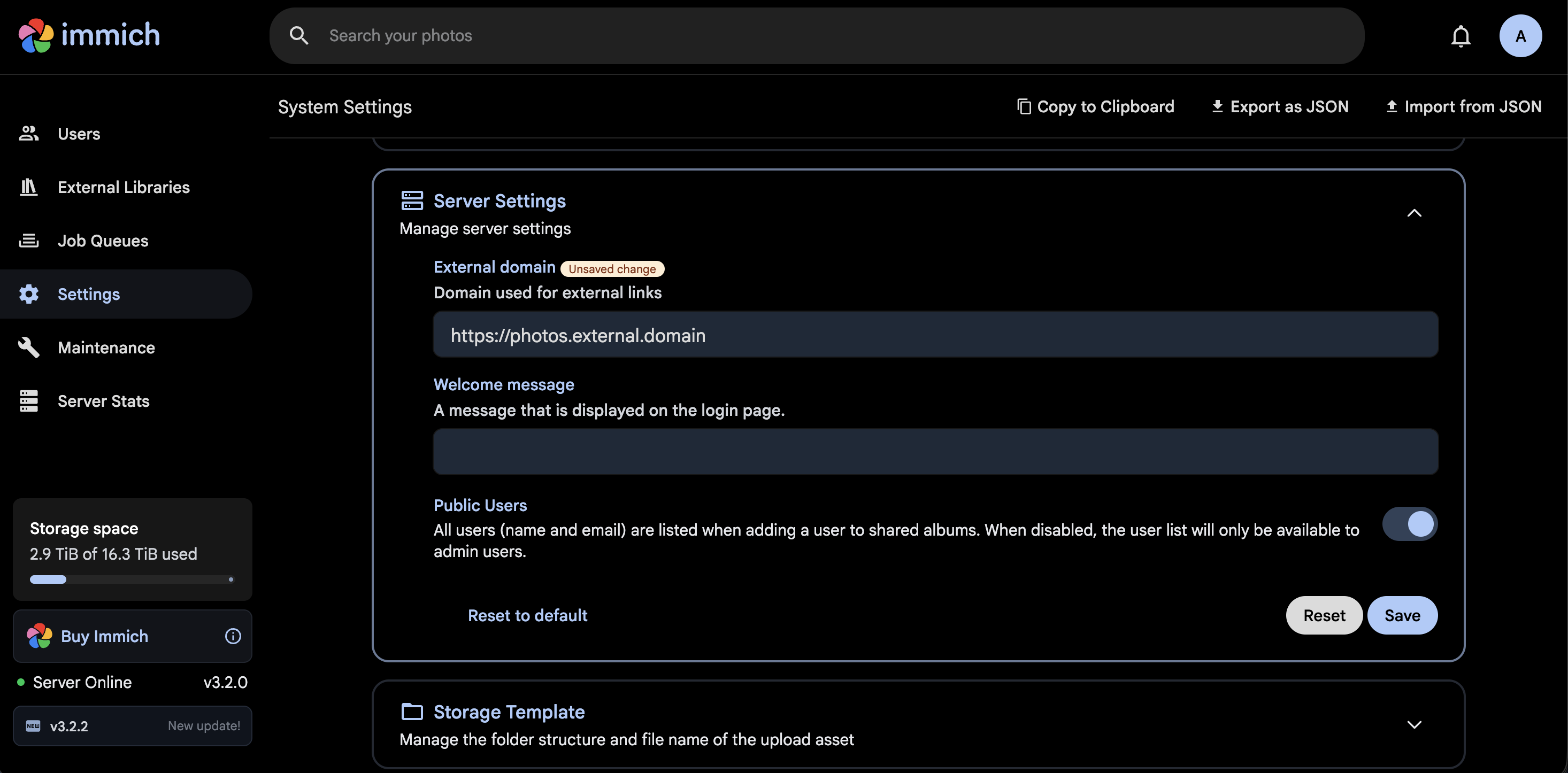
- Log into your Immich web interface as an Administrator (using your private/VPN router or internal IP).
- Navigate to Administration ➔ Settings ➔ Server Settings.
- Under External domain, enter your public router's URL (e.g.,
https://photos.domainorhttps://photos.example.com). - Click Save.
TIP
Setting the External domain guarantees that whenever you create a public album or shareable link, Immich automatically prefixes links with your hardened public domain (https://photos.domain/share/...), which points to the RouteWarden-protected public router.
RouteWarden Dual-Router Configuration
Select your gateway below to see the full configuration. Diff highlights show the RouteWarden-specific additions:
# dynamic_conf.ymlhttp: middlewares: # RouteWarden shield applied ONLY to the public-facing router immich-public-shield: plugin: routewarden: enabled: true enableDefaultPatterns: true # Blocks .env, .git, config dumps pathPatterns: - '(?i)^/api/auth/login.*$' - '(?i)^/api/auth/admin-sign-up.*$' - '(?i)^/api/users.*$' - '(?i)^/api/admin.*$' - '(?i)^/api/server-info/stats.*$' response: mode: json statusCode: 404 body: '{"error":"Not Found","message":"Endpoint unavailable on public router"}' routers: # 1. PUBLIC ROUTER: Accessible over the web for public photo/album sharing immich-public: rule: "Host(`photos.example.com`)" entryPoints: - websecure middlewares: - immich-public-shield service: immich-service # 2. PRIVATE ROUTER: Accessible only via internal VPN / Tailscale / LAN immich-private: rule: "Host(`photos-internal.example.com`)" entryPoints: - internal # No RouteWarden restriction: full admin and login functionality available service: immich-service services: immich-service: loadBalancer: servers: - url: "http://immich-server:2283"Alternative: Single Router with IP Whitelisting Bypass
If you prefer using a single domain name (e.g. photos.example.com) without maintaining separate public and private hostnames or entrypoints, you can configure RouteWarden's allowedIps feature:
# dynamic_conf.ymlhttp: routers: immich: rule: "Host(`photos.example.com`)" entryPoints: - websecure middlewares: - immich-smart-shield service: immich-service middlewares: immich-smart-shield: plugin: routewarden: enabled: true enableDefaultPatterns: true pathPatterns: - '(?i)^/api/auth/login.*$' - '(?i)^/api/auth/admin-sign-up.*$' - '(?i)^/api/users.*$' - '(?i)^/api/admin.*$' - '(?i)^/api/server-info/stats.*$' # Trusted Home / VPN Subnets bypass the shield: allowedIps: - "10.0.0.0/8" # Internal LAN - "100.64.0.0/10" # Tailscale CGNAT subnet - "192.168.1.0/24" # Home Office subnet response: mode: json statusCode: 404 body: '{"error":"Not Found","message":"Resource unavailable"}' services: immich-service: loadBalancer: servers: - url: "http://immich-server:2283"With this approach:
- When you connect while connected to your Tailscale / WireGuard VPN or home Wi-Fi,
allowedIpsmatches your client IP, allowing unrestricted login and administration. - When an external user or scanner hits
photos.example.comfrom the internet, login and admin endpoints return 404 Not Found, while public album links continue working smoothly.
Security Verification & Curl Tests
1. Test from Public Internet (Simulated Attack)
# Attempt to access login API from public internetcurl -i https://photos.example.com/api/auth/login# Response:# HTTP/2 404# content-type: application/json# {"error":"Not Found","message":"Endpoint unavailable on public router"}# Attempt to probe server statistics or user listcurl -i https://photos.example.com/api/server-info/statscurl -i https://photos.example.com/api/users# Both return 404 Not Found immediately without touching Immich backend!2. Test Public Photo Sharing (Allowed Traffic)
# Public shared album link accessed from the internetcurl -i https://photos.example.com/share/abcdef123456# Response:# HTTP/2 200 OK# Immich serves shared album viewer successfully3. Test from Internal / VPN Router
# Admin login from internal VPN router or whitelisted IPcurl -i https://photos-internal.example.com/api/auth/login# Response:# HTTP/2 200 OK (or backend response from Immich authentication handler)Key Benefits of this Architecture
- Zero Exposure of Authentication Surfaces: Attackers cannot brute-force passwords, credential-stuff, or discover admin endpoints.
- Cloaked Topology (404 Not Found): Scanners receive a standard 404, leading them to believe the API endpoints do not exist.
- Upstream Load Reduction: Blocked requests are intercepted at the proxy level in microseconds, avoiding database queries and application CPU overhead on Immich.
- No Custom Forks: No need to patch or fork the upstream application; security policy is maintained cleanly at the network perimeter.