Case Study: Dual-Router Security for Immich Self-Hosted Photos
This case study demonstrates a real-world production pattern: securing a self-hosted web application with a dual-router architecture using Routewarden.
We use Immich (a self-hosted high-performance photo and video backup solution) as the primary example, though this pattern applies equally to Nextcloud, Jellyfin, Vaultwarden, Home Assistant, and internal SaaS tools.
The Challenge
You want to share public photo albums, shared timeline links, or public asset previews with family, friends, or clients over the internet (e.g., photos.yourdomain.com).
However, exposing Immich directly to the public web introduces significant attack surface:
- Root Path Redirects & Web UI Login: Immich has no public homepage at
/. Visiting/unconditionally issues anHTTP 302/307redirect to/auth/login. If unshielded, internet users and scanners load the complete web login UI. - Authentication & Login APIs: Brute-force credential stuffing against
/api/auth/login. - Administrative Endpoints: Exposure of
/admin(web UI) or/api/admin/*and/api/server-info/stats. - User Management: Public scanning against user enumeration APIs like
/api/users*. - Account Registration: Public bot registrations against
/auth/admin-sign-upor/api/auth/admin-sign-up*.
The Goal
- Private Router (Admins / Family): Accessible via internal network / VPN (WireGuard, Tailscale, or corporate subnet). Has full access to all features, administration, background jobs, user management, and login.
- Public Router (Internet): Accessible publicly to view shared photos/albums (
/share/*), but hardened with Zero-Trust Allowlisting—permitting strictly the public share viewer, required server config, and media assets, while default-denying the root path/, authentication, and administrative endpoints before they can ever reach the Immich backend or trigger login redirects.
Architecture Diagram
Immich Configuration: Setting the External Domain
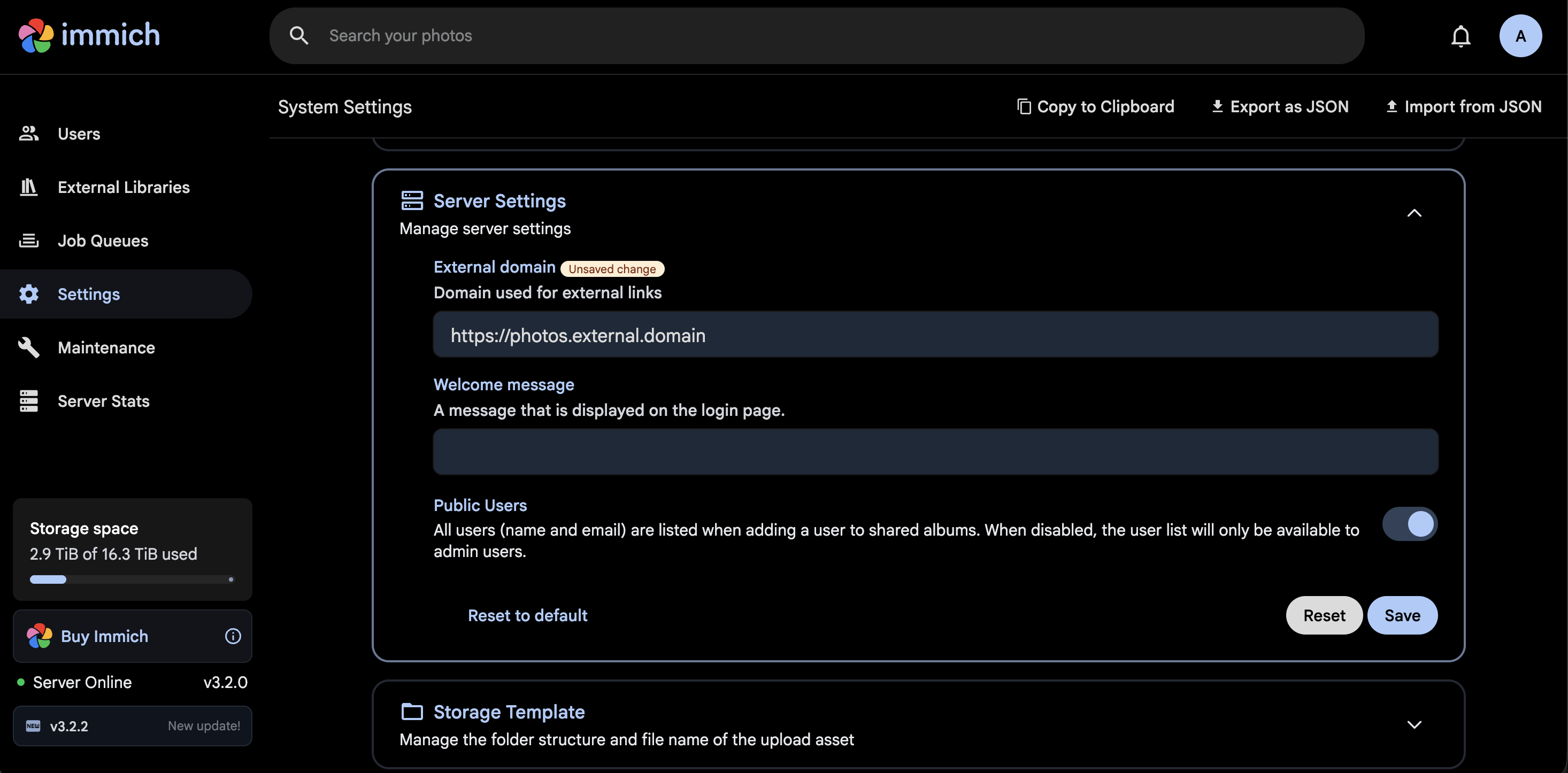
When Immich generates public share links (e.g. for photo albums or partner sharing), it must know which public domain to embed into the generated links instead of your internal/VPN IP.
- Log into your Immich web interface as an Administrator (using your private/VPN router or internal IP).
- Navigate to Administration ➔ Settings ➔ Server Settings.
- Under External domain, enter your public router's URL (e.g.,
https://photos.domainorhttps://photos.example.com). - Click Save.
TIP
Setting the External domain guarantees that whenever you create a public album or shareable link, Immich automatically prefixes links with your hardened public domain (https://photos.domain/share/...), which points to the Routewarden-protected public router.
Routewarden Dual-Router Configuration
Select your gateway below to see the full configuration. Diff highlights show the Routewarden-specific additions:
# dynamic_conf.ymlhttp: middlewares: # Routewarden shield applied ONLY to the public-facing router immich-public-shield: plugin: routewarden: enabled: true methods: - GET - POST - PUT - DELETE - PATCH - HEAD enableDefaultPatterns: true # Blocks .env, .git, config dumps # Zero-Trust Allowlist: permit strictly public share viewer & required APIs allowPatterns: - '(?i)^/share(/.*)?$' - '(?i)^/api/shared-links(/.*)?$' - '(?i)^/api/server/media-types$' - '(?i)^/api/server/config$' - '(?i)^/api/server/features$' - '(?i)^/api/assets(/.*)?$' - '(?i)^/_app(/.*)?$' - '(?i)^/(favicon.ico|manifest.json)$' # Catch-all: default-deny all other routes (blocks root redirects, login UI, admin) blockPatterns: - '(?i)^/.*$' response: mode: json statusCode: 404 body: '{"error":"Not Found","message":"Endpoint unavailable on public router"}' routers: # 1. PUBLIC ROUTER: Accessible over the web for public photo/album sharing immich-public: rule: "Host(`photos.example.com`)" entryPoints: - websecure middlewares: - immich-public-shield service: immich-service # 2. PRIVATE ROUTER: Accessible only via internal VPN / Tailscale / LAN immich-private: rule: "Host(`photos-internal.example.com`)" entryPoints: - internal # No Routewarden restriction: full admin and login functionality available service: immich-service services: immich-service: loadBalancer: servers: - url: "http://immich-server:2283"Crucial Implementation Notes & Production Caveats
1. HTTP Methods: Why methods is Mandatory
By default, Routewarden inspects only GET requests (methods: ["GET"]) to preserve performance for non-idempotent operations unless configured otherwise.
However, modern web applications like Immich execute credential checks and administrative operations using POST, PUT, and DELETE:
- Login attempts:
POST /api/auth/login - Admin sign-ups:
POST /api/auth/admin-sign-up - User creations:
POST /api/users
WARNING
If you omit the methods directive, Routewarden will inspect only GET requests. An attacker sending a POST /api/auth/login credential brute-force request would completely bypass Routewarden and hit the Immich backend directly. Always explicitly define:
- Caddy:
methods GET POST PUT DELETE PATCH HEAD - Traefik (YAML / TOML):
methods: ["GET", "POST", "PUT", "DELETE", "PATCH", "HEAD"] - NGINX (Lua):
methods = { "GET", "POST", "PUT", "DELETE", "PATCH", "HEAD" }
2. Public Share Links (/share/...), Media APIs & Password-Protected Albums
Immich provides two types of public shares:
- Unprotected Albums: Visitors access
GET /share/<shareKey>. The Immich frontend loads and retrieves preview assets via/api/assets/*. - Password-Protected Albums: The visitor is presented with a password prompt. Submitting the password sends a
POST /share/<shareKey>request with the password payload. Immich validates the password, sets a session cookie, and returns anHTTP 303 See Otherredirect back toGET /share/<shareKey>.
When viewing public shares, the Immich web frontend requires access to a minimal set of endpoints:
(?i)^/share(/.*)?$: Public album viewer interface and password submission handling (POST /share/<shareKey>).(?i)^/api/shared-links(/.*)?$: Shared link metadata API (GET /api/shared-links/me?key=...), which validates the share key and returns the album structure.(?i)^/api/server/media-types$: Supported MIME types query (GET /api/server/media-types), required by the frontend player to determine playback capabilities.(?i)^/api/server/config$: Public server configuration API (GET /api/server/config), required to render the application theme, branding, and enabled public features.(?i)^/api/server/features$: Features API query (GET /api/server/features), required by the client to discover enabled server-side capabilities (e.g. search, oauth, trash).(?i)^/api/assets(/.*)?$: Asset streaming, photo thumbnails, and video previews.(?i)^/_app(/.*)?$: SvelteKit static bundles (JS, CSS, fonts).(?i)^/(favicon\.ico|manifest\.json)$: Standard browser icons and web app manifest.
Because Routewarden evaluates allowPatterns before testing block patterns, all legitimate sharing interactions function seamlessly while every unlisted route is safely blocked.
3. Stealth Cloaking (404 Not Found) vs silentDrop (Avoid 502 Edge Errors)
In our snippets, the recommended response is mode: json (or mode: html) with statusCode: 404:
"response": { "mode": "json", "statusCode": 404, "body": "{\"error\":\"Not Found\",\"message\":\"Endpoint unavailable on public router\"}"}IMPORTANT
If your reverse proxy is placed behind an edge proxy or CDN (such as Cloudflare, Traefik edge gateway, AWS ALB, or NGINX), avoid using mode: silentDrop.
When Routewarden drops or resets a TCP connection under silentDrop, the upstream edge proxy cannot complete the connection and will return an HTTP 502 Bad Gateway error page to the client. Using mode: json or mode: html with statusCode: 404 returns a natural, stealthy "Not Found" response that mimics a non-existent route without causing edge proxy 502 errors.
4. Caddy Directive Ordering
When using Caddy, you must register Routewarden before Caddy's built-in reverse_proxy directive in the global options block:
# Caddyfile Global Options{ order routewarden before reverse_proxy}Without this directive order, Caddy will fail to start with the error: directive 'routewarden' is not an ordered HTTP handler. Alternatively, you can encapsulate Routewarden and your proxy inside an explicit route { ... } block.
5. Why Immich / Redirects to /auth/login (and How Zero-Trust Allowlisting Prevents Bypass)
By default, Immich has no public homepage at the root path (/). When an unauthenticated visitor accesses https://photos.example.com/:
- Immich responds with an
HTTP 302/307 Redirectpointing to/auth/login(the web UI login form). - The browser automatically follows the redirect and issues a
GET /auth/loginrequest.
The Fragility of Traditional Denylisting (Blocklists)
If your Routewarden configuration relies solely on a blocklist (denylist) targeting specific paths (e.g., ^/api/auth/login):
- The initial request to
/passes through to Immich, which issues the 302 redirect. - The redirected request to
/auth/logindoes not start with/api/, so it bypasses Routewarden entirely, causing Immich to render the full web login screen to public visitors. - Even if you manually add
/auth/logintoblockPatterns, any future endpoint or unexpected redirect introduced in upstream updates could create another bypass. Denylisting forces administrators to play an endless, error-prone game of "whack-a-mole".
The Zero-Trust Inversion (Default-Deny)
By inverting Routewarden's security model to Zero-Trust Allowlisting:
- Catch-All Block (
blockPatterns: ['(?i)^/.*$']): Routewarden enforces a strict default-deny policy across the entire domain. Any unlisted route—including the root path/,/auth/login,/admin, and internal APIs—is immediately intercepted and cloaked with a 404 Not Found at the edge proxy. Because the initial request to/never reaches Immich, Immich never gets the opportunity to return the 302 redirect. - Precedence-Based Allowlist (
allowPatterns): Because Routewarden evaluatesallowPatternsbeforeblockPatterns, only explicitly authorized public routes pass through to the Immich backend:(?i)^/share(/.*)?$: Public album viewing and password verification (POST /share/<key>).(?i)^/api/shared-links(/.*)?$: Shared link metadata API (GET /api/shared-links/me?key=...).(?i)^/api/server/media-types$: Supported media MIME types query (GET /api/server/media-types).(?i)^/api/server/config$: Public server configuration (GET /api/server/config).(?i)^/api/server/features$: Features API query (GET /api/server/features).(?i)^/api/assets(/.*)?$: Asset streaming, photo thumbnails, and video previews.(?i)^/_app(/.*)?$: SvelteKit frontend JavaScript and CSS bundles.(?i)^/(favicon\.ico|manifest\.json)$: Browser favicons and web application manifest.
This architecture is completely immune to upstream routing changes, new admin screens, or redirect maneuvers.
Alternative: Single Router with IP Whitelisting Bypass
If you prefer using a single domain name (e.g. photos.example.com) without maintaining separate public and private hostnames or entrypoints, you can configure Routewarden's allowedIps feature:
# dynamic_conf.ymlhttp: routers: immich: rule: "Host(`photos.example.com`)" entryPoints: - websecure middlewares: - immich-smart-shield service: immich-service middlewares: immich-smart-shield: plugin: routewarden: enabled: true methods: - GET - POST - PUT - DELETE - PATCH - HEAD enableDefaultPatterns: true # Zero-Trust Allowlist: permit strictly public share viewer & required APIs allowPatterns: - '(?i)^/share(/.*)?$' - '(?i)^/api/shared-links(/.*)?$' - '(?i)^/api/server/media-types$' - '(?i)^/api/server/config$' - '(?i)^/api/server/features$' - '(?i)^/api/assets(/.*)?$' - '(?i)^/_app(/.*)?$' - '(?i)^/(favicon.ico|manifest.json)$' # Catch-all: default-deny all other routes for external traffic blockPatterns: - '(?i)^/.*$' # Trusted Home / VPN Subnets bypass the shield: allowedIps: - "10.0.0.0/8" # Internal LAN - "100.64.0.0/10" # Tailscale CGNAT subnet - "192.168.1.0/24" # Home Office subnet response: mode: json statusCode: 404 body: '{"error":"Not Found","message":"Resource unavailable"}' services: immich-service: loadBalancer: servers: - url: "http://immich-server:2283"With this approach:
- When you connect while connected to your Tailscale / WireGuard VPN or home Wi-Fi,
allowedIpsmatches your client IP, allowing unrestricted login and administration. - When an external user or scanner hits
photos.example.comfrom the internet, login and admin endpoints return 404 Not Found, while public album links continue working smoothly.
Security Verification & Curl Tests
Test public route cloaking, redirect prevention, public photo sharing, and internal admin access:
# 1. Probe the root URL (prevents 302/307 redirect to /auth/login)curl -i https://photos.example.com/# Response:# HTTP/2 404# content-type: application/json# {"error":"Not Found","message":"Endpoint unavailable on public router"}# 2. Probe the web UI login URL directlycurl -i https://photos.example.com/auth/login# Response:# HTTP/2 404# content-type: application/json# {"error":"Not Found","message":"Endpoint unavailable on public router"}# 3. Probe the authentication API (credential brute-force)curl -i -X POST https://photos.example.com/api/auth/login \ -H "Content-Type: application/json" \ -d '{"email":"admin@example.com","password":"password123"}'# Response:# HTTP/2 404# content-type: application/json# {"error":"Not Found","message":"Endpoint unavailable on public router"}Key Benefits of this Architecture
- Zero Exposure of Authentication Surfaces: Attackers cannot brute-force passwords, credential-stuff, or discover admin endpoints.
- Cloaked Topology (404 Not Found): Scanners receive a standard 404, leading them to believe the API endpoints do not exist.
- Upstream Load Reduction: Blocked requests are intercepted at the proxy level in microseconds, avoiding database queries and application CPU overhead on Immich.
- No Custom Forks: No need to patch or fork the upstream application; security policy is maintained cleanly at the network perimeter.